

























จากบทความก่อนหน้านี้ ผมได้กล่าวกึงการติดตั้ง DirSync แต่มีคำถามว่าเราจะเลือกเฉพาะ OU หรือ User ได้อย่างไร?
- อย่างแรกให้ไปที่ Directory Sync Server และไปที่โฟลเดอร์ C:\Program Files\Windows Azure Active Directory Sync\SYNCBUS\Synchronization Service\UIShell
- เปิด MIISClient
- คลิก Management Agents
- คลิก Active Directory Connector
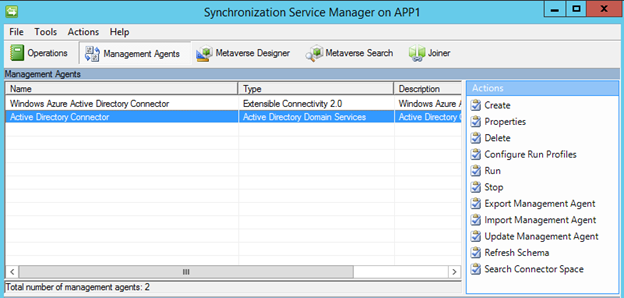
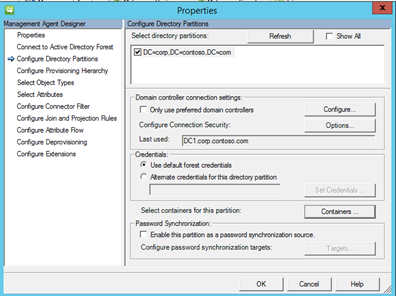
- คลิก Configure Directory Partitions
- เลือก Domain
- คลิก Containers
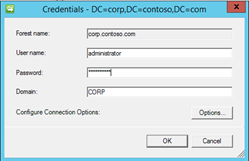
- กรอก Admin Credential ของ Domain Controller
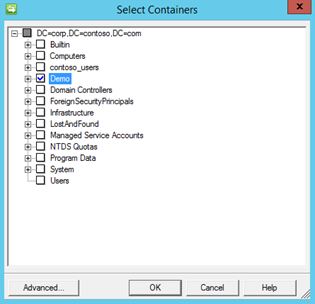
- เลือก OU ที่ต้องการ
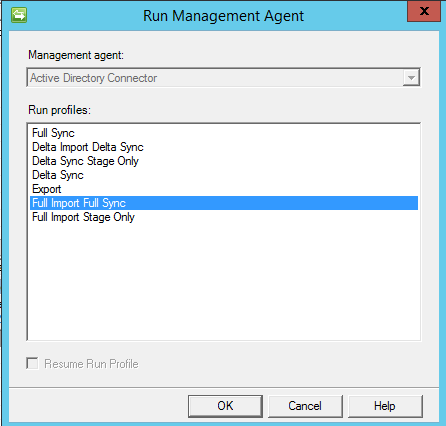
- หลังจากเลือก OU แล้วให้คลิกขวาที่ Active Directory Connector เลือก Run
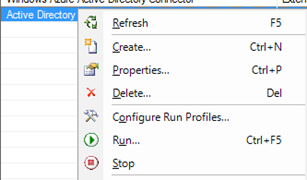
- เลือก Full Import Full Sync
Remark: ถ้าจะไม่ให้ DirSync ทำการซิงค์ user ขึ้น Office 365 ทั้งหมด ตอนที่ติดตั้งครั้งแรกอย่าพึ่งคลิก Sync Now
ลองดูครับ